


Amazon Basic Masterclass: A to Z Account Management – Onsite Training

By Reymar Gargoles
Categories: Onsite Training
About Course
In this comprehensive course, we will guide you through the foundational steps of becoming an effective and skilled Amazon Virtual Assistant (VA).
Whether you’re new to the world of Amazon or looking to refine your skills, this course will equip you with the knowledge and tools needed to manage and support Amazon sellers effectively.
You’ll learn everything from understanding Amazon Seller Central to assisting with inventory management, order processing, pricing, and customer service. We’ll also introduce you to essential tools, best practices, and workflows used by successful Amazon VAs to help your clients grow and manage their businesses.
By the end of this course, you will have the skills and confidence to assist Amazon sellers and help streamline their operations, making you an invaluable asset to any Amazon-based business.
Schedule
- Monday to Friday
- Training Discussion Time: 7:00 PM to 9:00 PM
- Internship Program Time: 7:00 PM to 9:00 PM – Once the training has been completed.
Batch 10 Schedule
| Course | Start Date | End Date | |
| Live Class Training | Amazon Master Class | ||
| Internship Program | SEO Listing Optimization | ||
| Internship Program | Product Sourcing | ||
| Internship Program | Logistics and Supply Chain | ||
| Internship Program | PPC Campaign | ||
| Internship Program | Account Specialists |
Student capacity: Only 10 students per batch allowed
Teaching Methods
- Live Discussion via zoom meet
- Live Internship Program via zoom meet
Payment Terms & Flexible Installment Options
- Down-Payment : ₱5,000.00 (Required to be officially enrolled)
- Weekly Installment Plan – Please message our page for more info
What You’ll Learn
- Introduction to Selling on Amazon
- Overview of Amazon Selling Models
- Benefits and drawbacks of each model
- Choosing the right model for your business
- Types of Amazon seller accounts
- Individual vs. Professional Seller Accounts
- FBA vs. Merchant Fulfilled Network (MFN)
- Verification process and requirements
- Setting up your access to the client Amazon seller account
- Email address to use for the access invite
- Accepting the client invitation
- How clients give you user permissions
- Catalog Management
- Add products and manage listings
- Upload and manage images, videos, and drafts
- Improve listing quality and optimize for success
- Inventory Management
- Manage all inventory, Seller Fulfilled Products, and FBA inventory
- Shipments and FBA fulfillment
- Pricing Management
- Pricing health, manage pricing, and automate pricing strategies
- Orders Management
- Create and manage orders
- Order reports, manage returns, and optimize your process
- Reports Management
- Access business reports, FBA fulfillment reports, and payments management
- Performance Management
- Monitor account health, feedback manager, and handle claims
- Improve your customer service skills and manage communications with buyers
- Essential Tools Overview
- Google Sheets, and popular Amazon seller tools like, Helium 10, and, Sellerboard
- Other Activities
- Resume creation, portfolio development, and practice interview with KPI feedback
- Final assessment and certification of completion
Course Content
Week 1 : Introduction to Amazon Seller Central for VAs
In this session, you’ll embark on a deep dive into the Amazon Seller Central platform, learning how to navigate and utilize its key features and powerful tools. You will explore the different Amazon selling models, including Fulfillment by Amazon (FBA) and Merchant Fulfilled Network (MFN), gaining a comprehensive understanding of their unique functions and benefits.
As a Virtual Assistant, you’ll discover the crucial role you play in supporting Amazon sellers, from effectively managing inventory and processing orders to optimizing product listings and enhancing customer interactions. By the end of this week, you’ll have a solid foundation in Amazon Seller Central, setting you up for success as a valuable asset to Amazon sellers worldwide.
Let’s get started on this exciting journey! 🌟
-
Day 1: Part 1 – Welcome to AMZ VA Academy
12:35 -
Day 1: Part 2 – Introduction to Weekly Review & KPI Feedback
02:46 -
Day 1: Part 2 – What is Amazon Virtual assistant job
28:15 -
Amazon selling models & their functions
00:52 -
How Sellers Set Up Their Amazon Seller Account
03:52 -
Types of Amazon seller accounts
02:49 -
How to Accept an Amazon Seller Account Invite
21:56 -
FBA vs. FBM Listing
32:16 -
Week 1 : Assessment
-
Day 5 : Weekly Review, Assessment, KPI Feedback
Week 2 : Catalog management
This lesson covers how to add, organize, update, and maintain product listings on Amazon. You’ll learn how to manage product details, categories, and ensure accuracy to boost visibility and sales.
-
Add Products Overview
40:03 -
Add Products via upload – Existing Listing
09:52 -
Add Products via Upload – New Listing
02:07:26 -
Add Products via Upload
23:43 -
Complete Your Drafts
57:27 -
View Selling Applications
57:27 -
Improve Listing Quality
57:27 -
Upload images using the Image Manager
57:27 -
Upload images via the edit option on the Manage Inventory page
01:32:13 -
Upload and Manage Videos
57:27 -
Upload images via flatfile
56:07 -
Add size charts
-
Week 2: Assessment
-
Day 5 : Weekly Review, Assessment, KPI Feedback
Week 3 : Inventory Management
In this section, you’ll learn how to assist in managing inventory and supporting sellers on Amazon, whether they are handling fulfillment themselves or using Fulfillment by Amazon (FBA). You will gain insights on how to support global selling, coordinate shipments to Amazon’s fulfillment centers, and manage remote fulfillment. The course will also cover how to track shipments, optimize FBA inventory, and identify growth opportunities for your client’s business. By mastering these tasks, you'll be well-equipped to help Amazon sellers streamline their operations and expand their business.
-
Manage All Inventory
03:02 -
Manage Inventory: Find Suppressed & Inactive Items
12:11 -
Day 1: Manage Inventory & Improve Listings
03:25:09 -
Manage Inventory & Boost Listing Quality
06:49 -
Manage Inventory – Fix Potential Duplicates
03:25:09 -
Manage All Inventory – Fix Price Alerts
03:25:09 -
Manage All Inventory – Custom Products
15:49 -
Manage All Inventory – Review compliance
15:49 -
Manage All Inventory – FBA Dashboard
26:05 -
Manage All Inventory – FBA inventory
01:57:27 -
Manage Inventory – Remove Unfulfillable Stock
01:57:27 -
Manage All Inventory – FBA Shipments Overview
01:57:27 -
Manage All Inventory – FBA Opportunities
04:35 -
Manage All Inventory – FBA Analytics
08:54 -
Manage Seller Fulfilled Products
07:38 -
Sell Globally
05:22 -
FBA Inventory
04:44 -
FBA Shipments
35:53 -
Create FBA Shipments
50:18 -
Remote Flfillment with FBA
21:40 -
Day 5 : Weekly Review, Assessment, KPI Feedback
-
Week 3: Assessment
Week 4: Orders and Non – PPC Promotion Management
In this lesson, we will focus on the following topics:
Orders: Understanding how businesses process customer orders, including the steps involved in managing and fulfilling them. This process may involve tasks such as inventory checks, order confirmations, packaging, and shipping.
Non-PPC Promotion: Exploring marketing strategies that do not rely on pay-per-click (PPC) advertising. These methods include organic approaches like search engine optimization (SEO), social media marketing, email marketing, influencer partnerships, and content marketing. Non-PPC strategies are cost-effective and help build long-term relationships with customers.
-
Manage Orders
33:38 -
Multi-Channel Fulfilment
04:55 -
Order Reports
03:27 -
Upload Order-Related Files
07:06 -
Manage Returns
01:22 -
Manage SAFE-T Claims
02:48 -
A+ Content Manager
40:10 -
Create A+ Content
40:35 -
Amazon Vine
08:56 -
Deals
05:12 -
Coupon/Vouchers
21:15 -
Price discounts
04:21 -
Prime Exclusive Discounts
00:00 -
Create a Promotion
07:21 -
Tailored Promotions
07:39 -
Day 5 : Weekly Review, Assessment, KPI Feedback
-
Week 4: Assessment
Week 5: Store Management, Reports and Payments Management, Performance
In this lesson, we will focus on the following topics:
Store Management: Understanding how to effectively manage a store, including inventory, listings, and overall operations.
Reports and Payments Management: Reviewing tools and strategies for generating reports and managing payment processes.
Buyer-Seller Messages: Best practices for effective communication between buyers and sellers to enhance customer satisfaction.
Help: Exploring support resources and troubleshooting methods to address common issues.
Settings: Navigating and configuring account and store settings for optimal performance.
Learn More: Additional resources and information to deepen understanding.
Common Tools to Use: A guide to the most useful tools for streamlining store and business operations.
-
Manage Store
01:22:17 -
Create storefront
01:36:16 -
Business Reports
01:22:17 -
Amazon Fulfilment Reports
01:22:17 -
Return Reports
01:22:17 -
Inventory Reports
01:22:17 -
Account Health
02:23:02 -
Feedback Manager
01:19:45 -
A – to – Z Guarantee Claims
01:19:45 -
Chargebacks
01:19:45 -
Performance Notifications
01:34:57 -
Voice of the Customer
01:19:45 -
Buyer-Seller Messages
01:49:02 -
Contact Amazon Seller Support
01:49:02 -
Week 5: Assessment
-
Day 3 : Guidelines for contacting Selling Partner Support
Week 6: Amazon VA Career Readiness and Certification
Create Resume and Portfolio
Practice Interview and KPI feedback
Final Assessment
Certification of Completion
-
Create Resume and Online Portfolio
-
Interview Practice
-
KPI Overall Feedback
-
Final Assessment and Certification
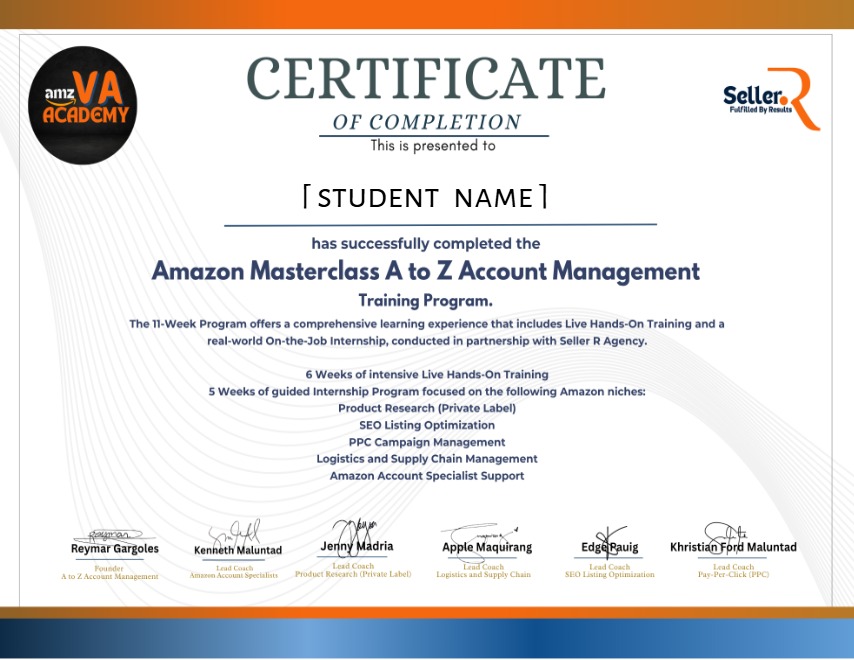
Earn a certificate
Add this certificate to your resume to demonstrate your skills & increase your chances of getting noticed.
Student Ratings & Reviews

No Review Yet
At AMZ VA Academy, our mission is simple: to empower aspiring Virtual Assistants with practical, real-world skills.